Same 256 mm build volume, same brand, very different machines. One is an open, easy, lower-cost bed-slinger; the other an enclosed CoreXY workhorse that prints ABS and up to 16 colours. Here is which fits you.
Disclosure: ReviewsTrusted may earn commissions from qualifying purchases made through links on this page. Our opinions remain independent and based on our research and evaluation process. Learn more.
The Bambu Lab P1S and the Bambu Lab A1 are the two printers most people weigh up when they decide to buy into Bambu Lab. They share the same 256 × 256 × 256 mm build volume, the same 500 mm/s headline speed and the same polished Bambu ecosystem — so on paper they look close. They are not. One is an open-frame bed-slinger built to be affordable and effortless; the other is a fully enclosed CoreXY machine built to print engineering materials and up to sixteen colours. That single structural difference decides almost everything.
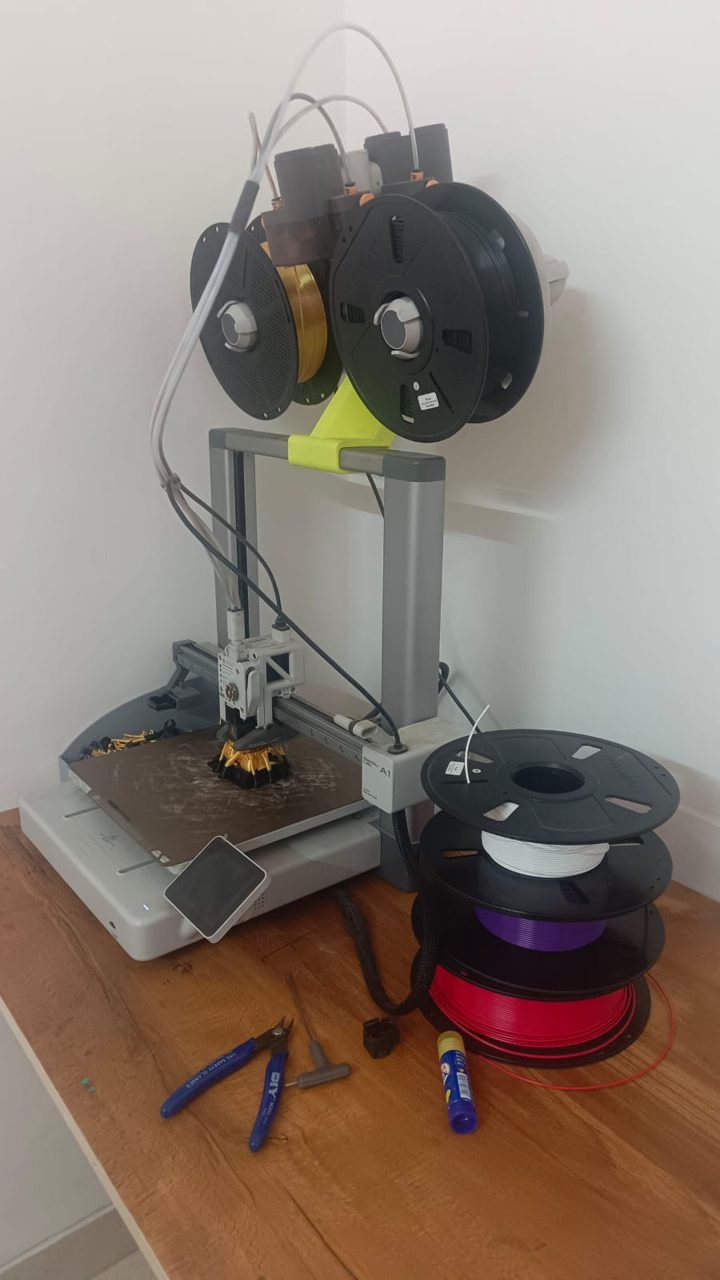
| Feature | Bambu Lab P1S | Bambu Lab A1 |
|---|---|---|
| Type | FDM · CoreXY (fully enclosed) | FDM · bed-slinger (open frame) |
| Build volume | 256 × 256 × 256 mm | 256 × 256 × 256 mm |
| Max speed | 500 mm/s (20,000 mm/s² accel) | 500 mm/s |
| Enclosure | Fully enclosed chamber | Open frame |
| Nozzle / bed | Up to 300°C / up to 100°C | Up to 300°C / up to 100°C |
| Multi-colour | AMS-ready — up to 16 colours | AMS lite — up to 4 colours |
| Camera | Chamber camera | Built-in 1080p |
| Air handling | Carbon filter | None |
| Filaments | PLA, PETG, TPU, ABS, ASA | PLA, PETG, TPU, PVA (no ABS/ASA) |
| Connectivity | Wi-Fi | Wi-Fi (LAN-only mode) |
| Best for | Engineering materials, multi-colour, production | Easy PLA/PETG printing, lowest cost |
Everything else flows from the frame. The P1S is a sealed CoreXY box: the head moves on two motors while the bed only travels down, and the enclosed chamber traps heat. That is exactly what high-temperature plastics like ABS and ASA need — warm, draft-free air so layers fuse instead of warping and cracking. The A1 is an open bed-slinger: the bed shuttles back and forth carrying the print, and there is no chamber to hold heat. It is brilliant for PLA, PETG and TPU, but it cannot reliably print ABS or ASA, because an open frame in a normal room loses heat too fast.
So the real question is not "which is better" but "what will you print?" If the answer is mostly decorative models, prototypes and PLA/PETG parts, the A1 does it beautifully for far less money. If the answer includes functional, heat-resistant or outdoor parts, only the enclosed P1S will do them properly.
More than the price gap suggests. Both share the same 256 mm cube of build volume, both quote 500 mm/s, both run inside Bambu Studio and the Handy app with the same clean profiles and RFID filament recognition, and both calibrate themselves with little fuss. Print quality on PLA and PETG is genuinely close between them — you are not buying sharper layers with the P1S, you are buying the chamber, the materials range and the colour count.
On everyday PLA and PETG the two are hard to tell apart. Where the P1S pulls ahead is on demanding prints: its CoreXY motion and 20,000 mm/s² acceleration keep the toolhead steadier at speed, so tall or intricate models show fewer ringing artefacts. The A1 is no slouch — it is one of the fastest bed-slingers around — but a moving bed has more mass to fling about than a CoreXY gantry.
The A1 is the friendlier first printer: lower price, open and approachable, with fully automatic calibration. The P1S is also easy by enclosed-printer standards, but it is a more serious machine and costs accordingly. For a nervous beginner the A1 is the gentler start; for someone who already knows they need ABS or colour, the P1S is worth starting on directly.
Identical, and that is a strength. Both live in Bambu's closed but polished ecosystem — Bambu Studio slicer, cloud and Handy app, RFID auto-config for Bambu filament, and the same AMS workflow. Whichever you pick, the day-to-day software experience is the same; you are choosing hardware capability, not a different app.
This is the headline. The enclosed P1S prints PLA, PETG, TPU, ABS and ASA — the full hobby-to-engineering range, including tough, heat-resistant and UV-stable parts. The open A1 sticks to PLA, PETG, TPU and PVA; ABS and ASA are not advised because the frame cannot hold chamber heat. If you will ever print functional brackets, enclosures, car or outdoor parts, this line alone may decide it.
Both do multi-colour, but at different scales. The A1 pairs with the AMS lite for up to four colours; the P1S is AMS-ready for up to sixteen colours across four AMS units — serious territory for detailed multi-colour models and varied production. Both include a camera: the A1 a 1080p unit for monitoring and timelapse, the P1S a chamber camera for watching enclosed prints. The P1S also adds a carbon filter to handle the fumes that come with ABS and ASA.
The A1 is an open machine that needs clear space front-to-back for its moving bed and runs as low as ~49 dB on a desk. The P1S is a self-contained box: its enclosure muffles sound and contains smell, and its footprint is more compact and stackable, though it is taller and heavier. In a small or shared room, the enclosed P1S is often the more liveable machine.
Filament is the main cost for both, and they use the same Bambu ecosystem of spares, so parts pricing and availability are similar. The P1S's extra running cost is materials: ABS and ASA need ventilation, and the carbon filter is a consumable. Across India, Bambu spares and both machines are available on Amazon.in and through Bambu's growing presence; neither has the vast third-party spare network the Creality Ender line enjoys, so buy from current, supported stock.
The A1's open frame makes nozzle and maintenance access slightly easier, and its lower price leaves budget for filament or an AMS lite. The P1S, being enclosed, is better at holding a stable temperature in a draughty or air-conditioned room and keeps dust off prints. The P1S is the heavier, taller unit; the A1 needs more desk depth for its moving bed. Neither is fragile, but the A1's exposed belts and bed benefit from occasional cleaning, while the P1S's chamber keeps things cleaner for longer.
Choose the Bambu Lab A1 if you mostly print PLA and PETG, you want the lowest-cost route into Bambu's ecosystem, and four-colour printing is plenty. It gives you most of the P1S's print quality and the same software for considerably less, and it remains one of the best-value printers you can buy.
Choose the Bambu Lab P1S if you need ABS or ASA, you want a chamber camera and carbon filter, you print in a small or shared room, or you want multi-colour beyond four. It is the more capable, more future-proof machine, and the enclosure is the feature you cannot add to an A1 later.
Prices shift often in India, so check the live figure on each printer's page before deciding — when the gap is wide, the A1's value is compelling; when Bambu runs a P1S deal, the step up gets much easier to justify.
Both are sold on Amazon.in and through Bambu's expanding India presence, with prices that move on sales and stock — check each printer's page for the live figure rather than trusting a fixed number. Budget for an AMS lite with the A1 or AMS units with the P1S if colour matters. Whichever you choose, the same local habits protect your prints: seal filament with silica gel through the humid monsoon months so it does not absorb moisture and string, and put long prints on a UPS so a power cut does not ruin an overnight run. If you buy the P1S for ABS or ASA, give it a ventilated spot — the enclosure and carbon filter help, but airflow still matters.
Read our full reviews and current pricing for each:
What is the main difference between the Bambu Lab P1S and the A1?
The P1S is a fully enclosed CoreXY printer that handles high-temperature materials like ABS and ASA and supports up to 16 colours. The A1 is an open-frame bed-slinger that is cheaper and simpler, but limited to PLA, PETG, TPU and PVA with up to four colours.
Do the P1S and A1 have the same build volume?
Yes, both are 256 × 256 × 256 mm. The difference is the frame, enclosure and material range, not the print size.
Can the A1 print ABS like the P1S?
No. The A1 is open-frame and officially limited to PLA, PETG, TPU and PVA. The enclosed P1S holds chamber heat, so it can print ABS and ASA reliably.
Is the P1S faster than the A1?
Both reach 500 mm/s, but the P1S's CoreXY motion and higher 20,000 mm/s² acceleration make it quicker and steadier on complex prints. The A1's bed-slinger design is still fast for its class.
How many colours can each printer print?
The A1 does up to four colours with the AMS lite. The P1S is AMS-ready for up to 16 colours using four AMS units.
Which is easier for a beginner?
The A1. It is simpler, cheaper and open, so it is less intimidating to start with. The P1S is still user-friendly but is a more capable, enclosed machine aimed at people who need its extra range.
Is the P1S worth the extra money over the A1?
If you need ABS or ASA, faster enclosed printing, a chamber camera and more colours, yes. If you mainly print PLA and PETG, the A1 delivers most of the same quality for less.
Which is better for a small printing business in India?
The P1S, for its material range, enclosure and up-to-16-colour capability suited to varied orders. The A1 is the lower-cost entry if you mainly produce PLA and PETG items.
Do both work well in Indian conditions?
Yes, with the usual care: store filament with silica gel during the monsoon and run long prints on a UPS. The P1S's enclosure also helps hold steady temperatures and keeps out drafts.
